PrepSync
Online debate flow

PrepSync Flow.

Flow the round, answer with your blocks, send the cards.

A flow with a column for every speech. Pull speeches in from SpeechDrop, answer arguments with blocks from your Card Library using a /command, and send the cards you lined up straight to your speech doc. Flow with your partner in real time.

Flow every round. Send every card.

Flow comes with a PrepSync membership, and it's connected to everything else: your blocks, your Card Library and your speech doc.

  • A column for every speech

    Set up for Public Forum, Lincoln-Douglas, Policy, World Schools and Congress, aff and neg.

  • Blocks from your Card Library

    Sync blocks to Flow and every block in your library files becomes a /command. Type one, hit Populate, and its cards drop in, one box each.

  • Send to your speech doc

    One click sends the cards in a speech's column to your speech doc, in order.
Start flowing
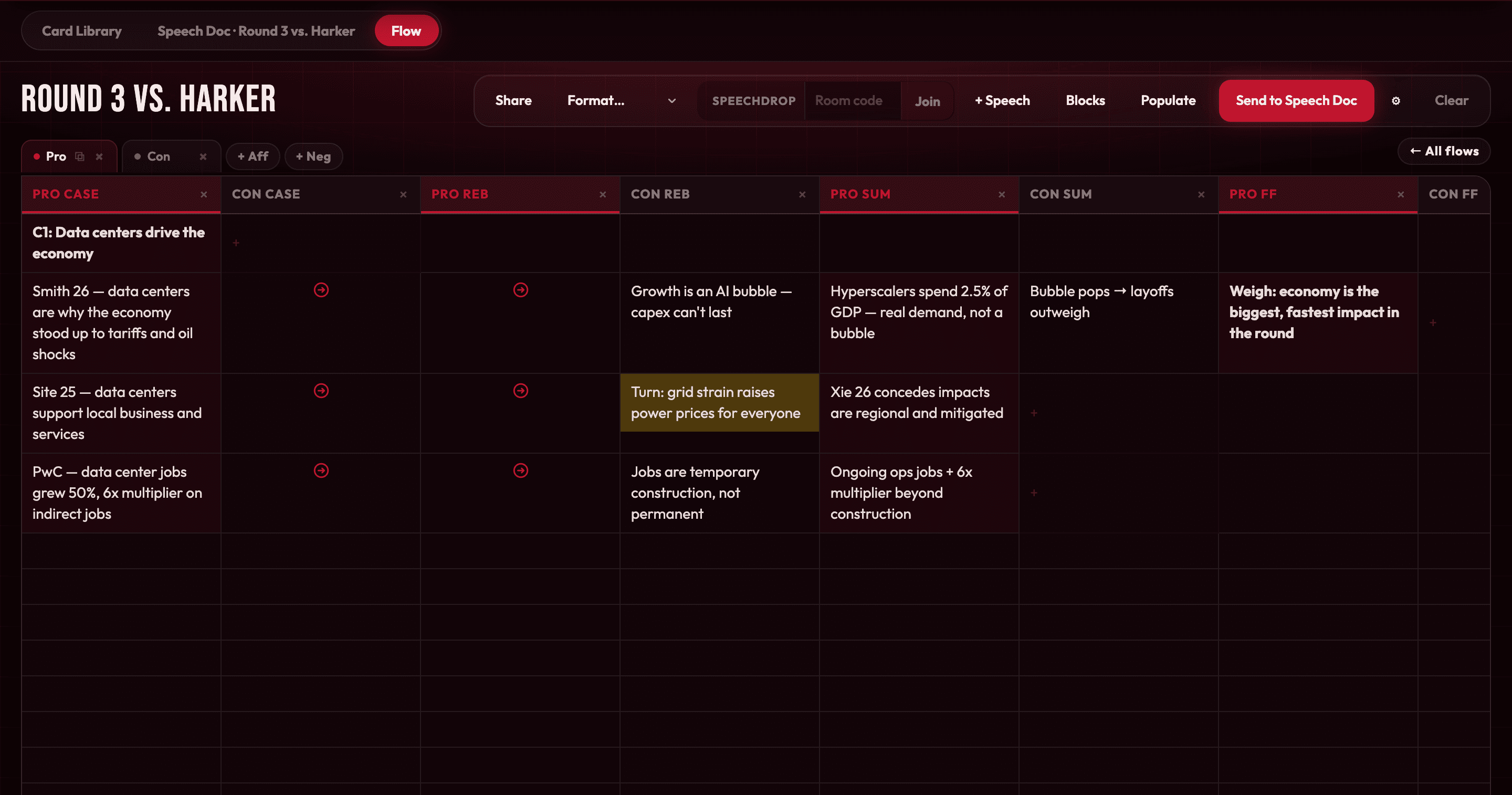
PrepSync Flow: a Public Forum round flowed across every speech, with the toolbar for SpeechDrop, blocks, Populate and Send to Speech Doc
Try a round
SpeechDrop
  1. 1Join a SpeechDrop room (any code)
  2. 2Add each case: it gets its own sheet
  3. 3On the Pro sheet, type / under Con Reb, pick a block, then Populate
  4. 4Send to Speech Doc
  5. 5Share it live with your partner
Pro Case
Con Reb
Pro Sum
Con Sum
Pro FF
Con FF
Flow comes with a PrepSync membership.See plans
Plans

Pick what you need.

Free
$0forever

Try PrepSync with no commitment. See what the platform can do.

Free includes:
  • 3 card cuts · lifetime
  • 3 rehighlights · lifetime
  • 5 searches · every 30 days
  • Judges lookup · unlimited
  • Debater lookup · unlimited
Start Free

No credit card required

Upgrade anytime
Monthly
$15per month

Full access on a flexible monthly plan. Cancel anytime.

Monthly includes:
  • Unlimited searches
  • Unlimited card cuts
  • Card extension, block view & file download
  • Full vault access
  • All current topics

Cancel anytime. No questions asked. · Season plans renew automatically until canceled.

About PrepSync Flow

PrepSync Flow is a debate flow in your browser. Each flow has a column for every speech in your format, with separate flows for each side, and every box can be answered in the next column so you can see how each argument was handled, speech by speech.

It's built for keyboard flowing: Enter for a new box, Shift+Enter to answer, arrow keys to move around, and shortcuts for bold, strike, fold and extend. Extending an argument carries it across the columns it skipped, so dropped arguments are easy to spot.

Flow is connected to the rest of PrepSync. Sync blocks to Flow turns the Block headings in your Card Library files into /commands; type one on your flow, hit Populate, and that block's cards drop in. When it's your speech, Send to Speech Doc puts those cards in your speech doc, skipping any boxes you deleted.

Join a SpeechDrop room to pull the other team's speech docs straight onto your flow, and share a round to flow it live with your partner. Every flow saves to your account, so you can come back to any round.

FAQ

Common questions.

A flowing tool in your browser, with a column for every speech, your blocks one /command away, and a button that sends your cards to your speech doc.
Public Forum, Lincoln-Douglas, Policy, World Schools and Congress, with aff and neg flows set up for each.
Every Block heading in your Card Library files becomes a /command when you sync blocks to Flow. You can also make blocks right in Flow. Type / and the block's name, then hit Populate. See the Card Library →
Yes. Share a round and you both edit the same flow and speech doc live.
Yes. Join a SpeechDrop room with its code and pull the other team's speeches onto your flow.
No. Only what's on the flow when you click Send to Speech Doc goes into your speech doc.
Yes. Every flow saves to your account, so you can open any old round from your list of flows.
Online Debate Flow: Flow Rounds in Your Browser | PrepSync